Best Explainer Video Tools & Services in 2026: DIY, AI, and Professional Options Compared
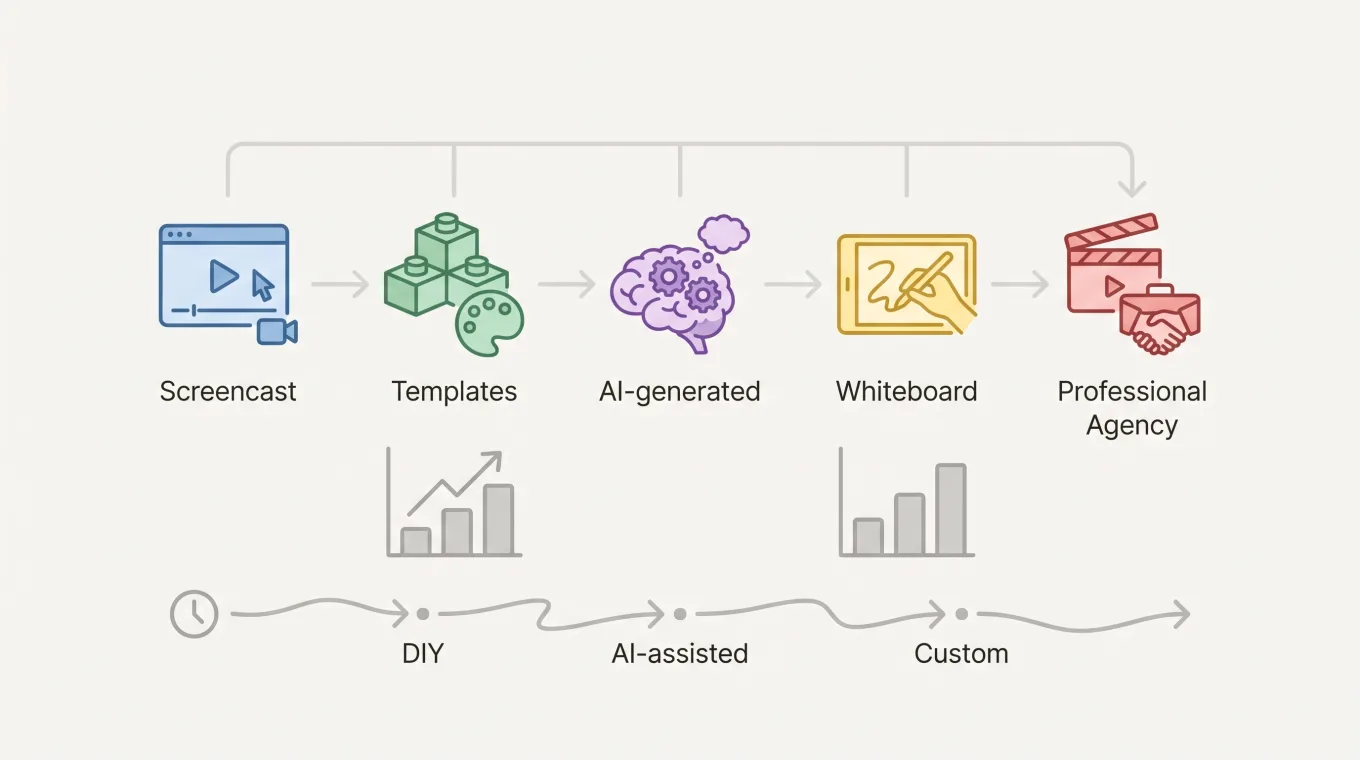
ShareRec is the best tool for quickly recording screencast-style explainer videos and walkthroughs — record your screen with voiceover and share an instant link as soon as you stop recording — while Canva, Powtoon, VideoScribe, and Explainly lead the free-template, AI-generated, whiteboard-animation, and professional-agency categories respectively. An explainer video is a 40-120 second video, animated, live-action, or screencast, that breaks down a product or idea in simple terms and closes with a call to action.
Canva builds free, templated explainer videos for beginners with no design experience. Powtoon turns an AI prompt or an uploaded document into a first-cut explainer video instead of starting from a blank canvas. VideoScribe keeps narration and pacing under full script control while animating whiteboard-style visuals. Explainly is a full-service agency handling research, strategy, copywriting, and custom animation for brands that need a polished, strategy-led result.
Pricing ranges from free (ShareRec, Canva, and Powtoon's free tiers) to $1,000-$20,000+ for agency production. Choose by format: screencast for product walkthroughs, templates for fast DIY, AI generation for a scripted first draft, whiteboard for narration control, or agency for a fully custom brand video.
What Is an Explainer Video?
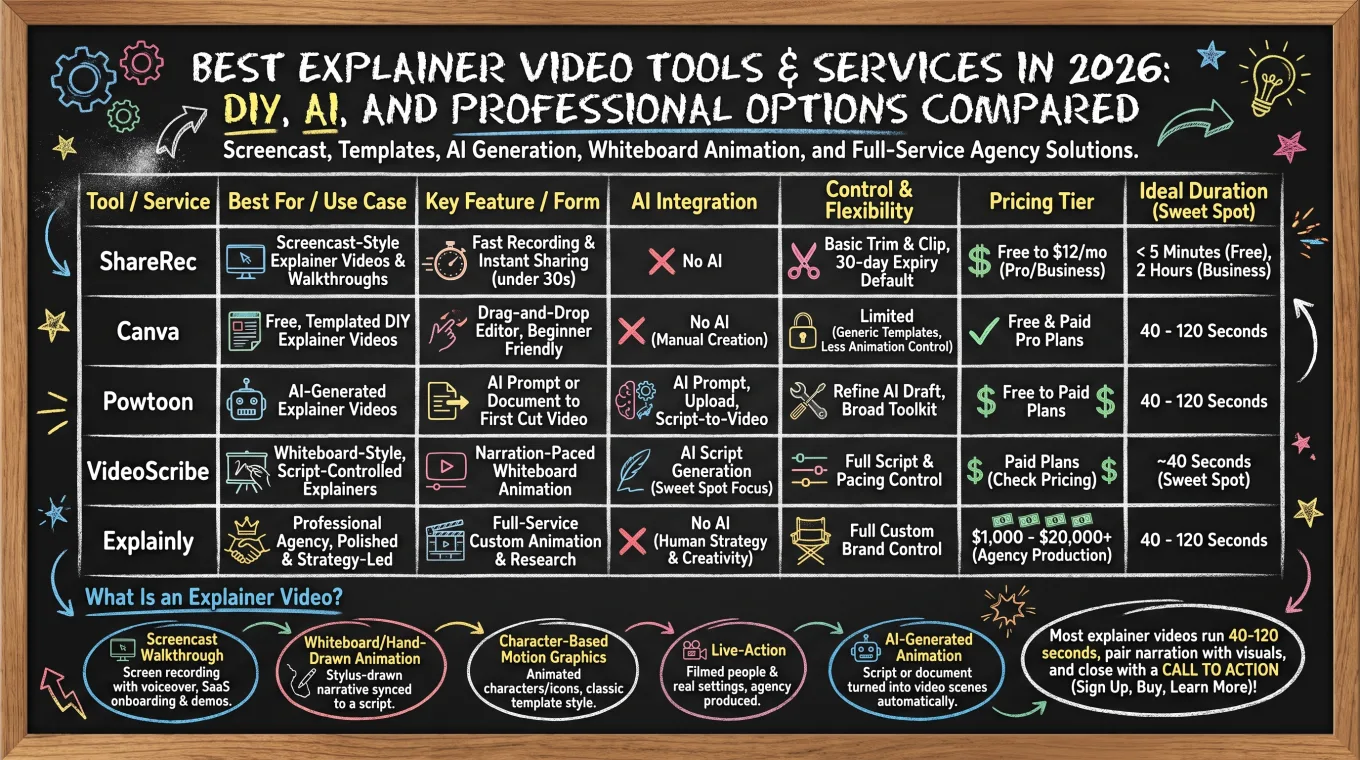
An explainer video takes one of five common forms — screencast walkthrough, whiteboard-style animation, character-based motion graphics, live-action, or AI-generated animation — each suited to a different use case.
- Screencast walkthrough: a screen recording with voiceover narration, used for SaaS onboarding and product demos.
- Whiteboard/hand-drawn animation: a stylus-drawn narrative synced to a script.
- Character-based motion graphics: animated characters and icons illustrating a process, the classic template style.
- Live-action: filmed people and real settings, typically produced by an agency.
- AI-generated animation: a script or document turned into finished video scenes automatically.
Most explainer videos run 40-120 seconds, pair narration with visuals, and close with a call to action pointing viewers to sign up, buy, or learn more.
ShareRec: Best for Screencast-Style Explainer Videos & Walkthroughs
ShareRec records your screen and voice together and turns the result into a shareable link, making it the fastest route to a screencast-style explainer video or product walkthrough. The workflow is record, explain, send. Open the browser-based recorder with no install, capture your screen with a voiceover, and get a link the moment you stop.
An account is required on every tier. The Free plan includes 720p recordings up to 5 minutes, no watermark, and keeps your 25 most recent videos, with trim-and-clip editing. Pro costs $8/month for unlimited videos, a 30-minute cap, and 1080p. Business costs $12/month for unlimited videos, a 2-hour cap, and 1080p.
Every video auto-expires 30 days after recording by default on all three tiers. You can keep any video forever in one click, or set a custom 24-hour, 7-day, or 30-day expiry. ShareRec sends a warning email three days before deletion.
ShareRec has no animation or whiteboard styles and no AI transcripts or auto-chapters, so it isn't built for polished marketing explainers.
Canva: Best for Free, Templated DIY Explainer Videos
Canva turns a pre-built template into a finished explainer video through a drag-and-drop editor, making it the most accessible option for beginners with no design or animation background. Pick a video template, swap in your own text, colors, and brand assets, then drop in stock or uploaded clips and export — no timeline animation or scripting skills required.
The free tier includes a library of video templates, basic stock footage and audio, and access to Canva's core editing tools, with no time limit on how long an account can stay on the free plan. Paid Canva Pro plans add a larger premium template and asset library, brand kit controls, and background removal — confirm current pricing directly with Canva.
Because Canva's templates are shared across a massive user base, explainer videos can look generic without real customization, and control over frame-by-frame animation timing is limited compared to dedicated explainer tools like VideoScribe. That tradeoff is what makes it fastest for beginners and least flexible for a fully custom look.
Powtoon: Best for AI-Generated Explainer Videos
Powtoon starts an explainer video three ways — an AI prompt, an uploaded document, or a template — turning a script into a rough video without a blank-canvas start. Teams feed in existing slides, a script, or a one-line prompt, and Powtoon assembles scenes, transitions, and a soundtrack automatically.
This makes Powtoon the strongest pick for teams that want AI to produce a first cut of an explainer video. Teams then refine that draft rather than animate every scene by hand. The free plan includes core editing tools and a template library. Paid plans add longer export lengths and brand kits — confirm current pricing directly with Powtoon before committing.
Powtoon is a broad AI video and animated-presentation platform rather than an explainer-only product, so its explainer features sit inside a wider toolkit. That broader focus means less category-specific depth than tools built solely around explainer video.
VideoScribe: Best for Whiteboard-Style, Script-Controlled Explainers
VideoScribe generates a script with AI first, then hands full control of pacing and narration to the creator for whiteboard animation built around roughly a 40-second sweet spot. Rather than auto-assembling a finished video, VideoScribe draws each element onto a whiteboard canvas in sequence, timed to a script the creator can edit line by line.
That length is long enough to land one idea and short enough to hold attention through the full hand-drawn sequence. Creators keep control of exactly what's said and when it's drawn, rather than accepting an auto-generated cut.
Plans include a free trial; ongoing subscription pricing should be confirmed directly with VideoScribe, since it changes over time. The hand-drawn whiteboard look is distinctive but not universal, so brands that need a polished corporate or live-action feel will find the aesthetic a mismatch.
Explainly: Best for Professional, Agency-Produced Explainer Videos
Explainly is a full-service explainer video agency whose projects typically run $1,000-$20,000+, covering research, messaging strategy, scriptwriting, and custom animation instead of a self-serve editor. A project moves through a producer and creative team rather than a template library. That suits brands that want a strategist shaping the video's message, not just its visuals.
Professional explainer video production industry-wide typically runs $1,000-$5,000 for a basic animated video and $5,000-$20,000 or more for a premium, fully custom production. Explainly scopes its own quotes per project rather than publishing a flat rate.
This makes Explainly the right fit for brands with a multi-week production timeline and a budget to match. A dedicated strategy and animation team outweighs the speed of a self-serve tool here. The tradeoff: agency production costs more and takes longer than any DIY or AI-assisted option covered here.
Explainer Video Tools Compared at a Glance
ShareRec starts free and delivers a shareable link as soon as you stop recording for screencast-style explainers, while Canva, Powtoon, VideoScribe, and Explainly cover free-template, AI-generated, whiteboard, and agency production at progressively higher cost and longer timelines.
| Tool | Best For | Starting Price | Key Feature | Limitation |
|---|---|---|---|---|
| ShareRec | Screencast-style explainer videos & walkthroughs | Free (account required) / $8/mo Pro / $12/mo Business | Instant shareable link with no upload step, browser-based | No animation/whiteboard styles; free tier caps recordings at 5 minutes |
| Canva | Free, templated DIY explainer videos for beginners | Free tier (paid Pro plans — verify current price) | Drag-and-drop video templates, no design or animation experience needed | Templates can look generic without customization; limited frame-by-frame animation control |
| Powtoon | AI-generated explainer videos from a script or document | Free tier available (paid plans — verify current price) | Generate a video from an uploaded document or AI prompt | Broad AI-video/animation platform, not explainer-only — less category-specific depth |
| VideoScribe | Whiteboard-style, script-controlled explainers | Free trial (paid plans — verify current price) | AI script generation + full narration control over whiteboard-style visuals | Whiteboard/hand-drawn aesthetic isn't suited to every brand |
| Explainly | Professional, agency-produced explainer videos | Custom quote, typically $1,000-$20,000+ | Full-service: research, strategy, copywriting, custom animation | Highest cost and longest turnaround of the options covered |
Key Takeaways
- ShareRec: record screen + voiceover, share a link as soon as you stop recording; account required on every tier.
- Canva: free templated explainer videos, best for total beginners with no design experience.
- Powtoon: generates explainer videos from an AI prompt or an uploaded document.
- VideoScribe: whiteboard-style animation with full script control, roughly a 40-second sweet spot.
- Explainly: full-service agency production, typically $1,000-$20,000+ depending on project scope.
- ShareRec and Canva need no animation skill and are the fastest to produce — a ShareRec screencast in under a minute — while VideoScribe and Explainly take longer.
Frequently Asked Questions
What is an explainer video?
An explainer video is a short video, typically 40-120 seconds, that uses animation, live-action, or screen capture to break down a product or idea in simple terms. It pairs narration with visuals and ends with a call to action. Example: a SaaS company's 60-second onboarding video showing a new user how to set up their first project.
How much does an explainer video cost?
Free DIY options like Canva and Powtoon's free tiers cost $0. Paid DIY subscriptions typically run $5-$50 per month. Professional agency production, like Explainly, typically costs $1,000-$5,000 for a basic video and $5,000-$20,000 or more for a premium custom production. ShareRec's screencast route costs $0-$12 per month depending on plan.
Can ChatGPT create explainer videos?
No — ChatGPT has no video-generation capability. It can write a script, storyboard, or voiceover copy. That script then goes into a tool like Canva, Powtoon, or VideoScribe (each with AI script or video generation) or gets read aloud during a ShareRec screencast recording.
Are explainer videos still popular in 2026?
Yes — interest in explainer videos has remained steady year over year, with predictable seasonal swings rather than a decline. Use cases stay concentrated in SaaS onboarding, EdTech course intros, and ecommerce product education, all of which rely on short video to cut support questions and boost conversions.
How long should an explainer video be?
Most effective explainer videos run 40-120 seconds — long enough to explain the idea, short enough to hold attention. VideoScribe cites roughly 40 seconds as its sweet spot for maintaining viewer engagement, while more detailed product walkthroughs can extend toward the two-minute mark without losing viewers.
What's the best tool for making an explainer video?
It depends on the format: Canva or Powtoon for free or AI-generated DIY video, VideoScribe for whiteboard-style script control, Explainly for professional, agency-produced video, and ShareRec for screencast-style walkthroughs — record your screen and voiceover and get a shareable link as soon as you stop recording, free with an account.
Try it free
Record your first walkthrough free — no install needed
No install, no watermark — share a link instantly.
Start Recording Free